Terrain, Part 2

By Shamus Posted Wednesday Feb 1, 2006

Filed under: Programming 8 comments

First-level optimization

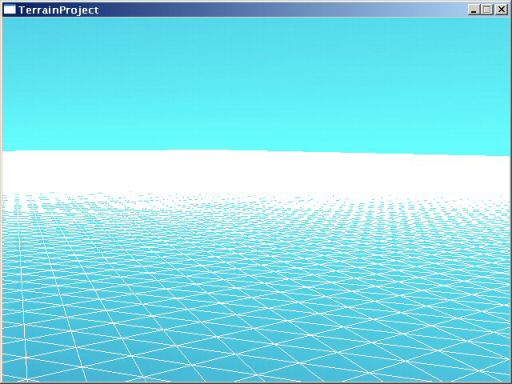
Last time we left off, I had created a very simple program for loading in a big ‘ol wad of terrain data and rendering it in painful, CPU-killing detail. This time I’m going to be adding code to cut down on the number of polygons drawn. Here is how the terrain looked last time:

Right now it’s rendering about half a million polygons, which is a grotesque waste of rendering power. There are way too many polygons, most of which we could do without. So how to simplify? There are any number of open-source solutions, but since the goal of this project is to write my own terrain engine from scratch, I’m going with this system as explained by Peter Lindstrom. It’s titled Terrain Simplification Simplified: A General Framework for View-Dependant Out-of-Core Visualization. Despite making the claim of simplicity twice in the title alone, this stuff is, in fact, quite tricky to grasp. Maybe the claims of simplicity are just dry humor. Or maybe I’m just dense. Either way, this stuff was brain-busting for me.

The goal here is to reduce flat areas into few polygons, and keep complex areas (slopes) more high-polygon.

The problem is that you need to smoothly transition from high-poly in one area to low-poly in another. If you don’t, there will be little gaps in the terrain between high and low detail areas. The background (the blue sky, in this case) will shine through the gaps.

But how do you do this? Imagine a piece of paper. On the left half of the paper you have dots an inch apart. On the right, the dots are two inches apart. Now, connect all the dots in such a way that you make only triangles, and that you use the fewest number of triangles possible. If you work at it for a while, you’ll do it. Now: Same piece of paper, except it’s 512 inches wide and 512 long. Some spots have dots an inch apart, others have dots 2 inches, others have dots every 4, 8, 16 or 32, or even 64 inches. Now try making the right triangles.

The secret here is a quad tree. This is a great way to handle a large grid of data, which is what I’m up to.

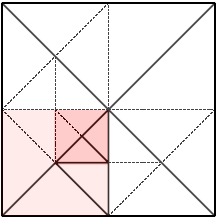
To use a quad tree, our grid must be a perfect square. It has to have the same width and height, and they must be a power of 2. In the terrain I’ve been using, the width and height is 512, which is 29. For our example here, let’s assume we’re working with an 8×8 grid, which is 23.
The main grid is divided into 4 quadrants. So, we have this sub-grid of 2 x 2. Then…
…each of those squares is, in turn, divided into 4 quadrants. This yields a sub-grid of 4 x 4, which in turn can be divided further, and so on.

Anyway, this gives us a way to look at the grid at different levels of detail.

My program starts at the largest blocks on the 2 x 2 grid. Let’s say it examines the four blocks in question and determines that the lower-left one is a bit hilly, and needs to be divided further. The other three quadrants are flat enough that they can be left alone. So, we divide the lower-left block.

Within that block, we have 4 smaller blocks, and of those 4, we determine that the upper-right has some detail that needs to be preserved, but the other 3 are again simple enough that they can be left alone. Once again, we divide the one block into 4 smaller ones.
Now for the magic. My program knows where the interesting detail is on the terrain, and what areas are flat and should be left simple. But how do I turn this into triangles?

The great thing about programming is that you can still follow a given set of directions and get to where you’re going, even if you don’t understand how to get there. By following the proceedures described in the Lindstrom article, I was able to get the triangulation to happen. However, I couldn’t actually understand it until I was done. This was an amazing moment. I didn’t know how to do it until after I’d done it. Strange.

The is one of those concepts where I wonder how someone thought of it in the first place. I can only conclude that they must be a good bit smarter than me.

It took most of last weekend to sort out these ideas and distill them into code. Still, the results are impressive:

The upper-right side of the image is of the unoptimized terrain. The lower-left is of the exact same view using the polygon-reduction system. Note that when viewed solid, and not wireframe as they are here, these two would look almost identical. That is, I’ve only sacrificed a tiny bit of visual quality. So how much did I save?

The new terrain is 158,000 polygons. So, I’ve removed an amazing two-thirds of the polygons from the scene.

There is obviously a tradeoff at work here. I can sacrifice visual quality for polygon reduction. If I’m too agressive, small hills and other details will vanish altogether, and the scenery will look bland. However, I’m not at the point where I want to start tuning it just yet.

Lighting

Looking at all of this wireframe is getting dull. Let’s make it solid and add some lighting.

By turning my optimizations off, I can now confirm that the optimized and non-optimized views are so similar that it isn’t even worth adding more screenshots to show the differences: they really do look almost the same.


Toughest Woman in the World

By Shamus Posted Wednesday Feb 1, 2006

Filed under: Pictures 6 comments

Along with this story about protesters fighting eviction in the West Bank, comes the following AP picture:

The original caption reads, “Settler struggles with an Israeli security officer in Amona outpost.” Uh, I count at least 8 security guys trying to give her the shove. And yet she seems to be doing pretty well. Against 8 men. In armor. Uphill.

It really captures the essence of the whole sad affair. I wish the story gave her name. I’d add her to the list of People I Won’t Piss off.


The Savage Within

By Shamus Posted Tuesday Jan 31, 2006

Filed under: Rants 1 comments

A while ago I was talking about how our civilization is greatly shaped and often dominated by our base instincts. In that post I was talking about our drive to “protect the children”, which has been an excuse for a lot of really destructive behavior.

But that is, in many ways, peanuts compared to the drive of males to compete and dominate. This business of blaming it on video games, movies, and sports is bizzare and infuriatingly counter-productive. Take a peek at nature. I think people would be shocked at just how much of our violent behavior is a result of base, primitive drives that reflect behaviors we see in animals. Even the most timid, rotund little accountant has the genes for skull-splitting combat buried beneath all the layers of civilization.

Think about the first time your girlfriend was attracted to another guy. How did you feel? Upset that she was so feckless? If you were a teenager, you probably wanted to kick his ass, even though that doesn’t make any sense. That’s the same wiring used when males needed to compete, via combat, for the right to mate. Now there it is in your 15-year-old civilized brain and you don’t know what to do with it.

You can’t educate these drives away, and the next best thing is to find a non-destructive way in which to satisfy those primal urges. Sports are another way to accomplish this.

We have other base drives, and we (ahem) manage to satisfy those even when we’re not in a position to actually mate. Take sports and games out of our lives, and those primal combat drives will still be there, but we will be without the tools to deal with them.


About me

By Shamus Posted Tuesday Jan 31, 2006

Filed under: Pictures 5 comments

I’m Shamus Young, a 34 year old software engineer and a happily married father of 3. In my free time I tend to play videogames, watch Anime, play D&D, and write software of dubious value. I also tend to write about these things here.

I don’t have any sort of degree.

You can probably extrapolate the rest by just looking around the site. I’m a stereotypical nerd. I’m the author of this Cyberpunk novel, and was the guy behind this politcal satire site.

You can reach me at:

shamus at shamusyoung dot com


Terrain, Part 1

By Shamus Posted Monday Jan 30, 2006

Filed under: Programming 25 comments

UPDATE 2/20/2006: After about a month, the project is now finished. You can go through the series and read my explanations for each step, or you can just page through and gander at the pretty pictures. If you’re the impatient sort, you could just jump to part 10 right now and see how it turned out.

The Project: Terrain Engine

My goal is to write a terrain engine from the ground up, using entirely new code. In most situations, something like this would be a component of a computer game. I will approach this project as if it was.

I’ve worked with several terrain rendering engines in the past. In my professional work, I maintain a large codebase that includes terrain rendering code. I’ve also messed with the Unreal Engine, which has an attractive terrain system. On the right are a few random terrain renders from different engines that I gathered up via Google image search. This is just to give an idea of where this project is headed, although I have a long way to go before I can make anything like those images.

I’m doing this in the interest of self-education – I don’t have a purpose in mind for this, although I will be setting goals and writing code as if this were part of a larger project. That means writing clean code (as opposed to slapdash prototype code) and being careful with processing power and memory usage, even though I’ll have plenty.

The first step is deciding what sort of terrain engine I want to write. If this were part of a game, how would the engine be used? Will it be viewed from ground level, like a first-person game, or will it be viewed from above as in a real-time strategy or a sim game? Even though this thing will not really be used in a game, I need to pretend that it will be, in order to know how to optimize things. So what’s the difference?

In a first-person game, nearby hills may block your view of far-off scenery. Fog or darkness usually limits visibility, to prevent seeing all the way to the horizon. You usually can’t see more than a mile (and usually much less than that) and the landscape is often very hilly. If I go this direction, I’ll have to write code for figuring out what areas are blocked by nearby hills and not rendering those parts. Terrain needs to look great up close: the player view is almost never more than six feet from the ground. (their own eye height) The world needs to be richly detailed and sharply rendered. In the images on the right, the third from the top is of Unreal Tournament, which is this sort of game.

By contrast, the other sort of game is usually viewed from an overhead perspective. The view distance is far gearter, but the ground doesn’t need to be quite as detailed since the user never gets very close to it. However, these sort of games usually require the ability to draw the entire landscape at once. In the images on the right, the topmost is from Black & White, which is this sort of game.

I don’t want to design a program that can do both but is good at neither. Since I have experience with the first type (first-person views) I’ll shoot for the other type and design this program to be good at rendering overhead views of terrain.

Techical info: I'm programming in C++ and using OpenGL for the rendering. While it is common in games to begin writing them with the expectation that computers will be twice as fast and have twice as much memory by the time you finish, I'm making the machines of today my target platform. I don't want to get sloppy.

The basics

The first step is a bit dull. I set up a project, add a seperate console window for debugging (not pictured), made it so I can fly around the terrain using the mouse, and a bunch of other very dull stuff.

Then I make the very first iteration of the terrain engine. For testing, I’m going to make the map a grid of 512 x 512 squares. This is not unreasonable. At this point, I’m making no attempt to optimize whatsoever. I just send the raw grid of data for rendering. The result is:

The most boring image ever!

512 x 512 squares comes to 262,144 squares, each of which is divided into two triangles for rendering. So, we’re looking at 524,288 total polygons. Each polygon is made up of three vertices (points), and so I send 1,572,864 vertices for rendering. That is a lot of data. Modern graphics cards can handle this with no problem, but once we start adding some stuff like trees, cities, alien armies, bikini girls, giant robots, pokemon, or whatever the hell else to the scene, we are really going to run out of processing power very fast. This “engine” is useless in its current form, unless all you want to do is look at terrain.

Adding elevation data

Before I can do anything interesting, I need some hills! Most games use terrain that was created by an artist, which means very unrealistic hills shaped like squashed hemispheres rising out of flat areas, elevated bowl-like depressions, and other nonsense. That looks passable when you’re on the ground, but looks fake from above. This sort of data also tends to be easier to optimize. I don’t want that.

I don’t want to wuss out, so I want something that looks real. This means using either USGS survey data or terrain created with an erosion simulator. I prefer the latter, since I can still control the overall shape of the world. I have some fabricated data left over from another project and it was easy to bring it over for this one.

A common approach is to keep the elevation data as a big greyscale image. This makes it easy to edit, and easy to “see” what the land looks like outside of the program. I’ll use a bitmap (windows BMP files are a good choice since they are easy to load, easy to create, and have lossless compression) where each pixel represents a single point on our grid. The brighter the pixel, the higher the point. That’s a good start, but greyscale BMP files don’t have very much depth. Each dot has a value between zero (totally black) and 255 (totally white). When you’re using the data to store high-resolution elevation data, 256 distinct values isn’t enough. If you want to really stretch the elevations out, so that you can have deep valleys and high mountains, then the terrain will end up looking like “steps”. This is very bad. It looks fake, and the jagged shapes will work hell on any attempt to simplify the terrain. To get around this, I’m still using a BMP file, but I’m using all three color channels. The BMP is really made up of three seperate images like so:

The red channel is the “overall” shape of the terrain. This channel is used for making the mountains and valleys. In this case, I just have a single bright blob in the middle. This will create a large gradual rise in the middle of the map, like a large (mountain-sized) pitcher’s mound. The green channel is our “real” elevation data, which has realistic hills like you would see in the real world. The blue channel is just uniform noise.

The red channel deals with values on the scale of hundreds of meters. The green channel deals with values of dozens of meters. The blue channel deals with values on the meter and sub-meter level. This is arbitrary: I could make the channels work on any scale I want, it’s just that this setup seems to be easy to work with and likely to generate some nice looking landscapes. These three channels are combined to form one composite image, which will be used to describe the shape of the terrain in our world.

This is a much reduced version. The original is 1024 x 1024. I’m only using one-fourth of it (since my world is 512 x 512 right now) but the rest of the data is there in case I want to go larger.

So I drop the new data into place. The result:

Not bad.

You can see how the grid of squares forms the landscape. The program pulls up the points that make up this grid, deforming it. This is a bit like throwing a blanket over something and determining its shape by observing how the blanket falls. This is the most common way to make terrain by far. I’m sure other methods exist, but I’ve never seen them in action.

Note one drawback: We only pull points up and down, but never move them horizontally. This means that we can never have things like an overhanging cliff or even a sheer vertical cliff. I don’t plan to re-invent the wheel here and try to find a way around this. Most people don’t notice these limitations, and overcoming them would require something far more sophisticated than what I’m planning. In games, if the designer really needs a sheer cliff or overhang, they usually add an object to the world (just like they would add a building or a tree) that creates the shape they need.

That’s it for our first update. Next time I’ll be taking this terrain and trying to render it using less polygons while retaining the smooth appearance.


Session 9, Part 5

By Heather Posted Saturday Jan 28, 2006

Filed under: D&D Campaign 5 comments

19th of Last Summer (Evening)

Once Skeeve and Enoch emerge from the meeting with the Queen, Fulan meets them in the main hall. Their travel papers are returned. Fulan provides them with additional horses, so that they will no longer have to share. This will speed travel for all of them.

The entire party returns to the inn. There is much to discuss. Endo and Beck join them. They debate at length on the job the Queen has given them. She has asked them to kill Noreeno. Now, they are happy to do this job. In fact, Eomer promised Noreeno that he would kill him. However, they have noticed that everyone seems to have secret motives and agendas. They are wary of being used again.

At length they come up with a plan: Endo is to ride south and seek out his friend, the prince. The rest of them will ride north and attempt to intercept Noreeno. However, instead of killing him outright, they plan to capture him and see what information they can extract from him before he dies.

Continue reading ⟩⟩ “Session 9, Part 5”


Like Christmas on Cybertron

By Shamus Posted Friday Jan 27, 2006

Filed under: Nerd Culture 5 comments

This came in the mail today. Like I said, this is my first new CD in about half a decade. There just hasn’t been much new music that made me want to pay full price for an album. Until now.

This is an innovative album full of infectious hooks and solid beats. Notable tracks include Organix, which has a fun rhyme and a punchline ending. JZ75 is another impressive track, where the group’s high-speed, high-bandwidth delivery will make you wonder if they really are machines. Precogni2 and Precognito are variations on the same brilliant lyrics, both of which are essential. Finally, Fuzzy Dice and Ford vs. Chevy are witty and fun tracks. The tracks are short but plentiful, keeping things fresh and coming at you from a lot of different angles.

Lead vocalist Wheelie Cyberman comes up with numerous complex and ever-changing Rhymes, while Bass player Stumblebee shows a great skill at coming up with basslines that puts the whole album on wheels.

The only nitpick is that a few tracks end with about 30 seconds of Japaneese(?) chatter and static. I’m not sure where they were going with this. It’s short and amusing at first, but after a few trips through the album I was anxious for them to end and get back to the fun.