 T w e n t y S i d e d


We had our first verifiable over-100 degree (F) day this week. The house we live in had a new A/C compressor and blower installed around 2010, so the part-owners we share ownership with still think of it as “new.” The system it replaced was installed when the house was first put up back in the mid-to-late 1970’s, so since that A/C lasted 30 years the one that’s 15-years-old is, obviously; new. Here’s the trick: when the “new” A/C was installed the empty-nester family didn’t use half of the house regularly. So they got a SMALLER compressor. It’s rated for just about 1/2 the square footage of our house. As a result we have installed supplementary window units in 2 bedrooms. It would be in all 3 bedrooms, but the window was removed in the third bedroom around 2010 as well when the bathroom next to two of the bedrooms was remodeled to have a giant bathtub. The owners then installed too-small of a water heater to fill the tub, so it never got used. That’s the bathroom that I recently renovated, by the way. I talked about it last summer. Keeping two bedrooms closed off from the central A/C system helps the small A/C compressor, but it is showing its age and honestly we need a third window-unit or mini-split for the living room. Every modern window unit we’ve installed has resulted in a DECREASED electric bill as we cut down on the demands on the central A/C. Kind of shows how far technology has come in the last few decades.
SteamOS, Valve’s Operating System for the Steam Deck, has been released as a stand-alone, free product. SteamOS is a distribution of Arch Linux designed for running Steam games, understandably. The primary functionality is the Proton compatibility protocols (I’ve talked about them before, several times) which are mostly instructions for the long-standing Linux program WINE (Wine Is Not Emulation, and that has stood up in court) which allow programs designed to run under Microsoft Windows to run in Linux. I personally have found Proton/Steam to work very well, but of course I have been using the tertiary concept: a Linux-native Steam client running on a non-Steam/non-Valve Linux installation. The idea is that the actual SteamOS released for public consumption would be even more generally “compatible”…if you check the Reddit subs for Linux Noobs or Gaming On Linux (there are several of each) you will see post after post titled “Does XXXXXX work on Linux?” and “Can’t get XXXXXX to work on Linux.” I think most of us would assume this represents a larger group of people than the ones who can’t get any particular Windows-designed game to work on their Windows PC.

I haven’t tried SteamOS; I should make that clear from the start. And I’m not going to claim the release of SteamOS is some kind of sea-change for computer users. It’s pretty clear that Valve has tried several gaming projects outside of the Steam store that have fizzled. While the Steam Deck has arguably not only been a success but fueled rivals such as the Asus ROG (a not-at-all confusingly named handheld that can’t be mistaken for the hundred other things labeled ‘Asus ROG’ despite technically being named the ‘Ally’), it follows the Steam Link and Steam Controller, and the Steam Machine concept in general. They were giving away Links and Controllers only months after they were introduced. Where SteamOS has a chance to succeed is taking the next step in Linux gaming, which has been at least a firmly-cracked-open door in the gaming community. The owners of Steam Decks have been mostly happy with the Deck’s ability to play a LARGE number of games. SteamOS promises access to the same games on a PC installation. Even as PC gaming is on the decline in favor of mobile gaming on a variety of handhelds the two vectors into PC usage are still “Games” and “What you use at school or work.” Valve’s caveat is displayed clearly, though. While you can download and install SteamOS however you want, Valve’s guarantee is *extremely* limited: “We expect most SteamOS users to get SteamOS preinstalled on a Steam Deck or device that incorporates SteamOS. The only devices officially supported on SteamOS right now are Steam Deck and Legion Go S.” In other words, if the Steam store says a game works on SteamOS, they mean a default installation of SteamOS as it came on a Steam Deck or a Legion Go S. Sure, they are *working* on more compatibility, but it’s not here yet. And it may not EVER get better; Valve is *very* good at empty promises.
Mobile gaming just has never done anything for me, at least not since high school. That was when the original Game Boy was released. My home computer was a Tandy 1000 with an 8088 processor and 640K of RAM. Portable computing in the way we think of it now was only just getting started. A Game Boy playing Nintendo Entertainment System-like games was miles ahead of PC gaming from my perspective, although those more familiar with certain systems like the Commodores or Atari 8-bit systems would have an argument to make regarding transportability. I have moved back and forth between PC gaming and console gaming since the late-1980’s. I find the current trend of mobile gaming for PC games to be intriguing, but I can’t make a solid use case for a ROG Ally, the Steam Deck, or the Lenovo Legion. Other choices, including older choices that may not even be supported any longer, primarily rely on streaming play, which I’m even less-interested in.

As I am a long-time Asus fan, I actually like the ROG Ally devices but I just wouldn’t use it. Not in my current life, anyway.
Linux Mint has been, from my point-of-view, just a continuation of what I was already doing. I can’t claim the problem I might have had with the Manjaro installation weren’t caused by me in the first place. I spent a lot of time even with that second install of Manjaro trying new things to get certain elements to work. Auto-mounting my second internal and assorted external USB hard drives didn’t work automatically under Manjaro; everything mounted properly under Mint from install. *HOWEVER* I should mention that the internal INSTALL drive had to have different settings applied to auto-mount where, say, Steam could see it (I talked about that just a week or two ago.) For some reason the default Cinnamon file manager (I’ve read this is Nautilus, but the “Preferred Apps” utility just calls it “Files”) loads the drive for file access just fine, but KDE’s “Dolphin” file manager keeps giving me an error when I try to access the INSTALL drive concerning the entry for the drive being missing. I just changed the default from “Files” to “Dolphin” so that will be an issue to resolve soon. As you can see, changing the default file manager was actually easy; Mint has a GUI app for that. Despite that problem, which I suspect will be another easy-to-solve problem, Dolphin adopts a lot of the default behavior from Windows that I’m used to. What finally prompted the actual change was the inability under the default to “click” a file name to edit it. This seems obvious and intuitive at this point to me, but the default file manager wouldn’t do it. Similarly the default screen capture worked fine; as far as I can tell it’s the Linux default. However Manjaro came loaded with the more-configurable Spectacle app. I can load that easy enough, though; as I tend to capture images in batches as a dedicated task.

Manjaro, on my Dell Inspiron 13 7000 2-in-1; has not had a problem. Go figure. I was a bit surprised Dell doesn’t make the Inspiron 13 anymore; you have to get a 14″ model. I would honestly rather have a 13″ or smaller as 14″ is really at the edge of “too big” for something sitting to the side of my desk. To be fair, you can get a 13″ or 13.3″ in multiple Latitude models, Multiple Pro models, and multiple XPS models. Just not the Inspiron, anymore. Weird.
I need to go clean the kitchen, now. More specifically there are A LOT of dishes to do because we did a combined Birthday/Memorial Day cookout. On the 100 degree day. That wasn’t fun.
That’s it for now, see you next week!

Starcraft: Bot Fight

Let's do some scripting to make the Starcraft AI fight itself, and see how smart it is. Or isn't.
Hardware Review
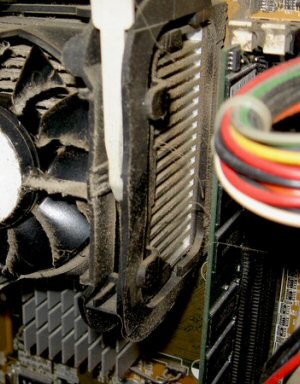
So what happens when a SOFTWARE engineer tries to review hardware? This. This happens.
Bad and Wrong Music Lessons

A music lesson for people who know nothing about music, from someone who barely knows anything about music.
Lost Laughs in Leisure Suit Larry

Why was this classic adventure game so funny in the 80's, and why did it stop being funny?
The Strange Evolution of OpenGL

Sometimes software is engineered. Sometimes it grows organically. And sometimes it's thrown together seemingly at random over two decades.
Happy Memorial Day to you, and good luck beating the summer heat! :)
I have a steam deck (Day 1 order – I’d been on the edge of getting a light laptop to have *something* to game on while travelling for a while, and the Deck was cheaper and lighter). It’s been my best gaming hardware purchase in a long time. I use at home a fair bit, not just when travelling, sometimes because someone else is on the PC and sometimes because it’s just nice to curl up on the couch with it.
I myself don’t really consider it a handheld, any more than I do my Switch. Sure, some people get a ton of use out of the portability, and it’s nice to have, but you can just plug it into a monitor and use it as a stationary device. Granted, a dock or 3rd party usb-c hub is a not-insignificant extra expense, but still. If you’re using it stationary, deck plus dock is still going to beat a lot of laptops or other prebuilts, with a much smaller form factor when you do have reason to go mobile. Heck, even the windows portables, if they could match the price and value, could be used the same. Basically, the gaming style portable computer vs the traditional laptop, the question is what you’re using it for when it’s not at home: bigger screen and keyboard for desktop applications, or more portable form factor with gamepad (and trackpad) inputs. And even then, you could simply get a more portable keyboard to go with it.
I’ve heard a lot of people say similar things. They didn’t want to drag a laptop around, but wanted PC access. Back when I was travelling a lot more I think I could have bought one, but right now I’m just not out of the house long enough.
Who doesn’t?
What Steam means by “not supported” is that they won’t help you if SteamOS fails on some other device – it does not mean that SteamOS won’t work on a plethora of devices, as it seems to do. This is because it’s at the core a streamlined way to install Steam, the Proton runtime, and related libraries and tools – it depends on linux kernel and shared library functionality to communicate with hardware. It should therefore work fine on anything that the linux kernel has similar compatibility with as the devices Steam says is officially supported by SteamOS – that is, the devices Steam Support will not tell you to go pound sand immediately if you contact them about a problem with.
I agree with that. My argument is solely from the point-of-view of someone who wants an experience as close to Windows as possible. From my perspective, I think Windows and Linux aren’t too far apart. I suspect there are more than enough people out there still who have trouble (or reasons) they can’t get even simple-to-run programs to work on their computer and when they have even slightly more trouble on Linux, it will just add to the idea that Linux *can’t* be a Windows replacement.